PS interrupts from GPIO
This time, I want to discuss GPIO interrupts in the ARM Cortex-A9 processor integrated into the Zynq-7000 architecture from AMD (Xilix).
In this exercise, I will change the implementation of the previous application Read GPIO from PS from a polled approach to a interrupt-driven approach.
System requirements
The application will turn on the red LED in LD0 while the button BTN0 is pushed. BTN1 turns on the blue LED in LD1. The LEDs will turn off after the button is released. If both buttons are pressed, both LEDs turn on.
Hardware configuration
Starting from the hardware configuration presented in Read GPIO from PS, it is necessary to activate the interruption in the AXI GPIO module associated with the button and in the processor. This is done in Vivado using the following steps.
- Create a new project in Vivado.
- Add a new Block design.
- In the block diagram, add a ZYNQ processor.
- Add a AXI GPIO IP block for the LEDs.
- Add another AXI GPIO for the buttons, select the checkbox Enable Interrupt.
- Use the Run Block Automation and RUN Connection Automation with All Automation selected.
- Open the configuration window ZYNQ7 block, go to Interrupts and select Fabric Interrupts.
- Open the PL-PS Interrupts Ports list and enable IRQ_F2P_[15:0].
- Connect the input port IRQ_F2P_[0:0] in the ZYNQ7 module to the output port ip2intc_irpt in the AXI GPIO module that connects the buttons.
- Validate Design.
- Regenerate Layout to organized it better.
- Generate Block Design, Use Global as Synthesis Options.
- Create HDL Wrapper. Find the block design file in the Sources tab of the Project Manager. The option is in the right-click menu.
- Check the pin assignments, voltage standards and pin direction by Open Elaborated Design.
- Generate Bitstream.
- Export Hardware from File menu. Include the bitstream. This step will create the .xsa from which a new platform will be created in Vitis.
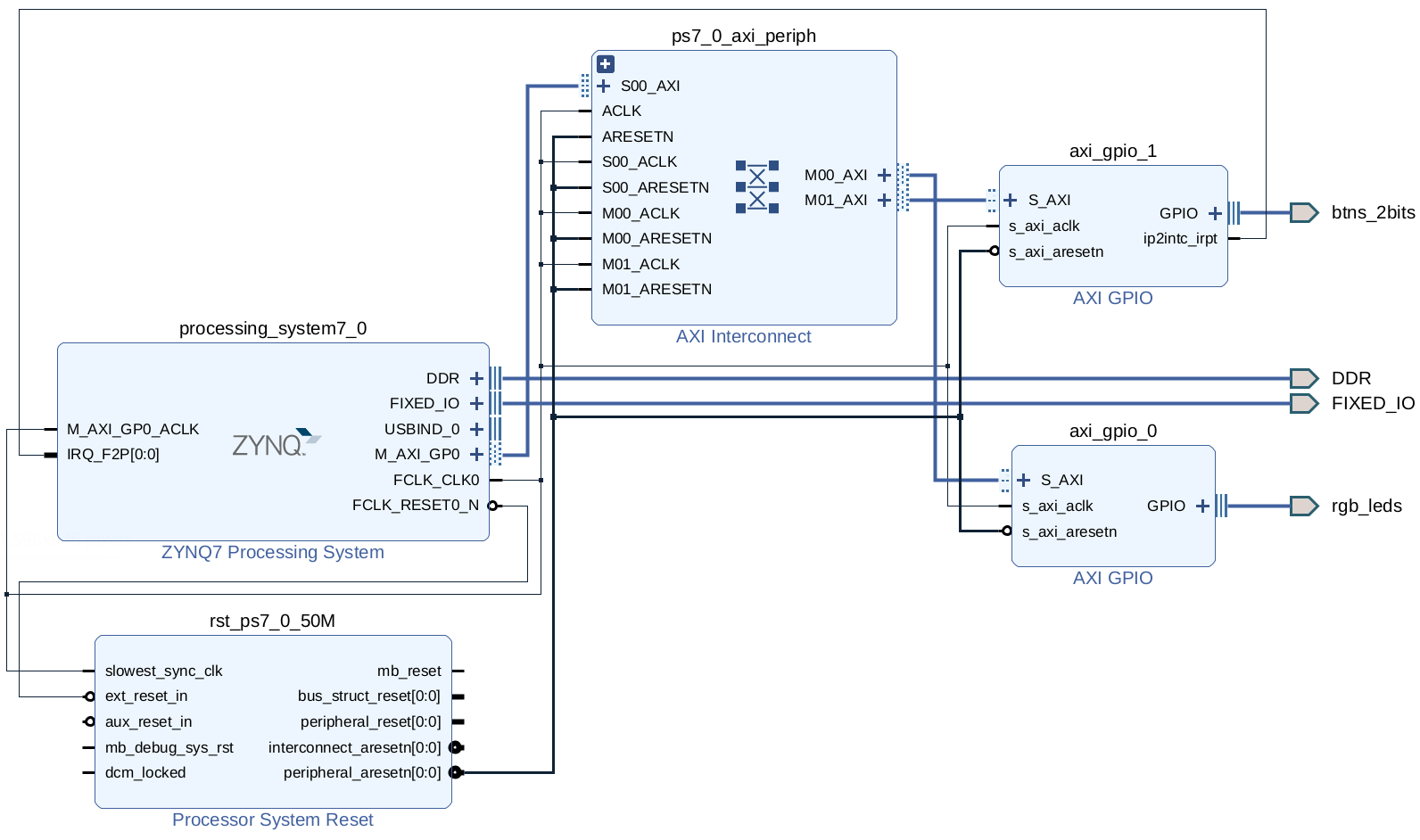 Figure 1. Block diagram with two AXI GPIO.
Software
Start by creating the Platform and Application projects and create an empty main.c file. If you forgot how to do it, check this series’s first post.
The complete code is below in this post. It consists of three functions. The main function, one for interrupt configuration and finally the interrupt handler, implements the actions we want to execute when the interrupt is triggered.
Includes
Compared with the previous exercise, there is one new library to load, xscugic.h. This file provides the driver to interact with the General Interrupt Controller (GIC).
In this case, the file xparameters.h also contains the definitions for fabric interrupts connected to the PS (XPAR_FABRIC_AXI_GPIO_1_IP2INTC_IRPT_INTR) and activates the GPIO interrupt (XPAR_GPIO_1_INTERRUPT_PRESENT).
#include "xparameters.h"
#include "xgpio.h"
#include "xil_types.h"
#include "xscugic.h"
Parameters definition
Focusing only on the definitions related to the interruption. There are three parameters to understand. I have to admit that I don’t completely understand what they mean; this is my best guess:
#define INTC_DEVICE_ID XPAR_PS7_SCUGIC_0_DEVICE_ID is the ID of the GIC we will use. In this case, the SoC has only one processor, so there is no other option than SCUGIC_0, but maybe when using a double-core SoC, there are two IDs to choose from.
#define INTC_GPIO_INTERRUPT_ID XPAR_FABRIC_AXI_GPIO_1_IP2INTC_IRPT_INTR is the ID of the interrupt connected to the IRQ_F2P port. In this case, the IP2INTC_IRPT part is the signal name of the GPIO interruption sent by the AXI GPIO module.
#define BTN_INT XGPIO_IR_CH1_MASK enables the interrupt from the first channel of the AXI GPIO module.
Main function
The initialisation and configuration of the GPIO device were discussed in previous posts. The only new thing here is the function’s calling that initialises the GIC. Finally, notice that the main loop does nothing. This main function configures and then waits for the interrupt.
int main()
{
	// Initialize AXI GPIO device
	cfg_leds = XGpio_LookupConfig(GPIO0_ID_LEDS);
	XGpio_CfgInitialize(&gpio_leds, cfg_leds,
			cfg_leds->BaseAddress);

	cfg_btns = XGpio_LookupConfig(GPIO1_ID_BTNS);
	XGpio_CfgInitialize(&gpio_btns, cfg_btns,
			cfg_btns->BaseAddress);

	// Set direction of the GPIO bits.
	// Bits set to 0 are output and bits set to 1 are input.
	XGpio_SetDataDirection(&gpio_leds, LED_CHANNEL, 0);
	XGpio_SetDataDirection(&gpio_btns, BTN_CHANNEL, 0b11);

	// Initialize interrupt controller
	init_interrupt(INTC_DEVICE_ID, &gpio_btns);

	while (1);
}
Interrupt setup
This function is the most interesting part of this post. Let’s start by presenting the initialisation function.
void init_interrupt(u16 GicDeviceId, XGpio *GpioInstancePtr)
{
	XScuGic_Config *IntcConfig;

	// GIC initialization
	IntcConfig = XScuGic_LookupConfig(GicDeviceId);
	XScuGic_CfgInitialize(&INTCInst, IntcConfig,
		IntcConfig->CpuBaseAddress);

	// Connect to the CPU
	Xil_ExceptionRegisterHandler(XIL_EXCEPTION_ID_INT,
		(Xil_ExceptionHandler)XScuGic_InterruptHandler,
		&INTCInst);
	Xil_ExceptionEnable();

	// Connect GPIO interrupt to handler
	XScuGic_Connect(&INTCInst,
		INTC_GPIO_INTERRUPT_ID,
		(Xil_ExceptionHandler)interrupt_handler_btns,
		(void *)GpioInstancePtr);

	// Choose and enable interrupt in the GPIO module
	XGpio_InterruptEnable(&gpio_btns, BTN_INT);
	XGpio_InterruptGlobalEnable(&gpio_btns);

	// Enable GPIO interrupt in the GIC
	XScuGic_Enable(&INTCInst, INTC_GPIO_INTERRUPT_ID);
}
The input variables for this function are the GIC device ID GicDeviceId and the GPIO module that provides the interrupt signal GpioInstancePtr.
The first step is the GIC initialisation. It is done in a similar fashion to the ones we used to initialise and configure the GPIOs in the main function. The function names change their prefixes, but the logic is equivalent.
// GIC initialization
IntcConfig = XScuGic_LookupConfig(GicDeviceId);
XScuGic_CfgInitialize(&INTCInst, IntcConfig,
		IntcConfig->CpuBaseAddress);
The following functions are still obscure to me.
// Connect to the CPU
Xil_ExceptionRegisterHandler(XIL_EXCEPTION_ID_INT,
		(Xil_ExceptionHandler)XScuGic_InterruptHandler,
		&INTCInst);
Xil_ExceptionEnable();
I understand them as a way to connect the GIC module, independent hardware, and the exception handler internal to the processor.
A key step is to define the interrupt handler that will run when the interrupt is triggered. In this case, it is interrupt_handler_btns.
// Connect GPIO interrupt to handler
XScuGic_Connect(&INTCInst,
		INTC_GPIO_INTERRUPT_ID,
		(Xil_ExceptionHandler)interrupt_handler_btns,
		(void *)GpioInstancePtr);
Finally, the required interrupt in the GPIO has to be activated; the module has to be allowed to produce interrupt signals, and the GIC system also has to be enabled.
// Choose and enable interrupt in the GPIO module
XGpio_InterruptEnable(&gpio_btns, BTN_INT);
XGpio_InterruptGlobalEnable(&gpio_btns);

// Enable GPIO interrupt in the GIC
XScuGic_Enable(&INTCInst, INTC_GPIO_INTERRUPT_ID);
Interrupt service routine
The function interrupt_handler_btns has the code to run when the interrupt is activated.
When serving interrupts, a good practice is to disable it while the function is running. Doing this avoids conflicts if the interrupt is triggered again while processing the previous one. The functions XGpio_InterruptDisable and XGpio_InterruptEnable take care of that. In addition, it is necessary to clear the interrupt pending flag before re-enabling the interruption. Otherwise, it will be immediately triggered.
void interrupt_handler_btns()
{
	u32 leds;
	u32 btns;
	u32 led_mask = 0b100001; // 0bBGRBGR

	// Disable GPIO interrupts
	XGpio_InterruptDisable(&gpio_btns, BTN_INT);

	// Read both buttons
	btns = XGpio_DiscreteRead(&gpio_btns, BTN_CHANNEL);

	// Find which button is pressed and turn on the
	// corresponding LED
	if (btns == 0b01) {
		leds = led_mask & 0b000001;
	}
	else if (btns == 0b10) {
		leds = led_mask & 0b100000;
	}
	else if (btns == 0b11) {
		leds = led_mask;
	}
	else {
		leds = 0;
	}
	XGpio_DiscreteWrite(&gpio_leds, LED_CHANNEL, leds);

	XGpio_InterruptClear(&gpio_btns, BTN_INT);

	// Enable GPIO interrupts
	XGpio_InterruptEnable(&gpio_btns, BTN_INT);
}
The rest of the code implements the LED control with the same logic as in a previous post. That code was moved from the main function to this one.
Complete code
This code is the minimum-minimorum necessary to enable the interrupt and implement the functionality we want.
#include "xparameters.h"
#include "xgpio.h"
#include "xil_types.h"
#include "xscugic.h"

#define GPIO0_ID_LEDS XPAR_AXI_GPIO_0_DEVICE_ID // LEDs
#define GPIO1_ID_BTNS XPAR_AXI_GPIO_1_DEVICE_ID // Buttons
#define LED_CHANNEL 1
#define BTN_CHANNEL 1
#define INTC_DEVICE_ID XPAR_PS7_SCUGIC_0_DEVICE_ID
#define INTC_GPIO_INTERRUPT_ID XPAR_FABRIC_AXI_GPIO_1_IP2INTC_IRPT_INTR
#define BTN_INT XGPIO_IR_CH1_MASK

XGpio_Config *cfg_leds;
XGpio_Config *cfg_btns;
XGpio gpio_leds;
XGpio gpio_btns;
XScuGic INTCInst;


// Interrupt handler for buttons
void interrupt_handler_btns()
{
	u32 leds;
	u32 btns;
	u32 led_mask = 0b100001; // 0bBGRBGR

	// Disable GPIO interrupts
	XGpio_InterruptDisable(&gpio_btns, BTN_INT);

	// Read both buttons
	btns = XGpio_DiscreteRead(&gpio_btns, BTN_CHANNEL);

	// Find which button is pressed and turn on the
	// corresponding LED
	if (btns == 0b01) {
		leds = led_mask & 0b000001;
	}
	else if (btns == 0b10) {
		leds = led_mask & 0b100000;
	}
	else if (btns == 0b11) {
		leds = led_mask;
	}
	else {
		leds = 0;
	}
	XGpio_DiscreteWrite(&gpio_leds, LED_CHANNEL, leds);

	XGpio_InterruptClear(&gpio_btns, BTN_INT);

	// Enable GPIO interrupts
	XGpio_InterruptEnable(&gpio_btns, BTN_INT);
}


// Interrupt Initialization
void init_interrupt(u16 GicDeviceId, XGpio *GpioInstancePtr)
{
	XScuGic_Config *IntcConfig;

	// GIC initialization
	IntcConfig = XScuGic_LookupConfig(GicDeviceId);
	XScuGic_CfgInitialize(&INTCInst, IntcConfig,
		IntcConfig->CpuBaseAddress);

	// Connect to the CPU
	Xil_ExceptionRegisterHandler(XIL_EXCEPTION_ID_INT,
		(Xil_ExceptionHandler)XScuGic_InterruptHandler,
		&INTCInst);
	Xil_ExceptionEnable();

	// Connect GPIO interrupt to handler
	XScuGic_Connect(&INTCInst,
		INTC_GPIO_INTERRUPT_ID,
		(Xil_ExceptionHandler)interrupt_handler_btns,
		(void *)GpioInstancePtr);

	// Choose and enable interrupt in the GPIO module
	XGpio_InterruptEnable(&gpio_btns, BTN_INT);
	XGpio_InterruptGlobalEnable(&gpio_btns);

	// Enable GPIO interrupt in the GIC
	XScuGic_Enable(&INTCInst, INTC_GPIO_INTERRUPT_ID);
}


int main()
{
	// Initialize AXI GPIO device
	cfg_leds = XGpio_LookupConfig(GPIO0_ID_LEDS);
	XGpio_CfgInitialize(&gpio_leds, cfg_leds,
		cfg_leds->BaseAddress);

	cfg_btns = XGpio_LookupConfig(GPIO1_ID_BTNS);
	XGpio_CfgInitialize(&gpio_btns, cfg_btns,
		cfg_btns->BaseAddress);

	// Set direction of the GPIO bits.
	// Bits set to 0 are output and bits set to 1 are input.
	XGpio_SetDataDirection(&gpio_leds, LED_CHANNEL, 0);
	XGpio_SetDataDirection(&gpio_btns, BTN_CHANNEL, 0b11);

	// Initialize interrupt controller
	init_interrupt(INTC_DEVICE_ID, &gpio_btns);

	while (1);
}
Single AXI GPIO variation
In the previous code, I used two AXI GPIO modules, one for LEDs and another for buttons. However, each module has two channels, so what would change when I combine LEDs and buttons in a single module?
Changes in hardware
One AXI GPIO module is removed from the original block diagram. Now, the first channel of the module connects to the LEDs and the second to the buttons. The interruption must be enabled, and the signal must be connected to the processor’s IRQ bus. The figure below shows the final diagram.
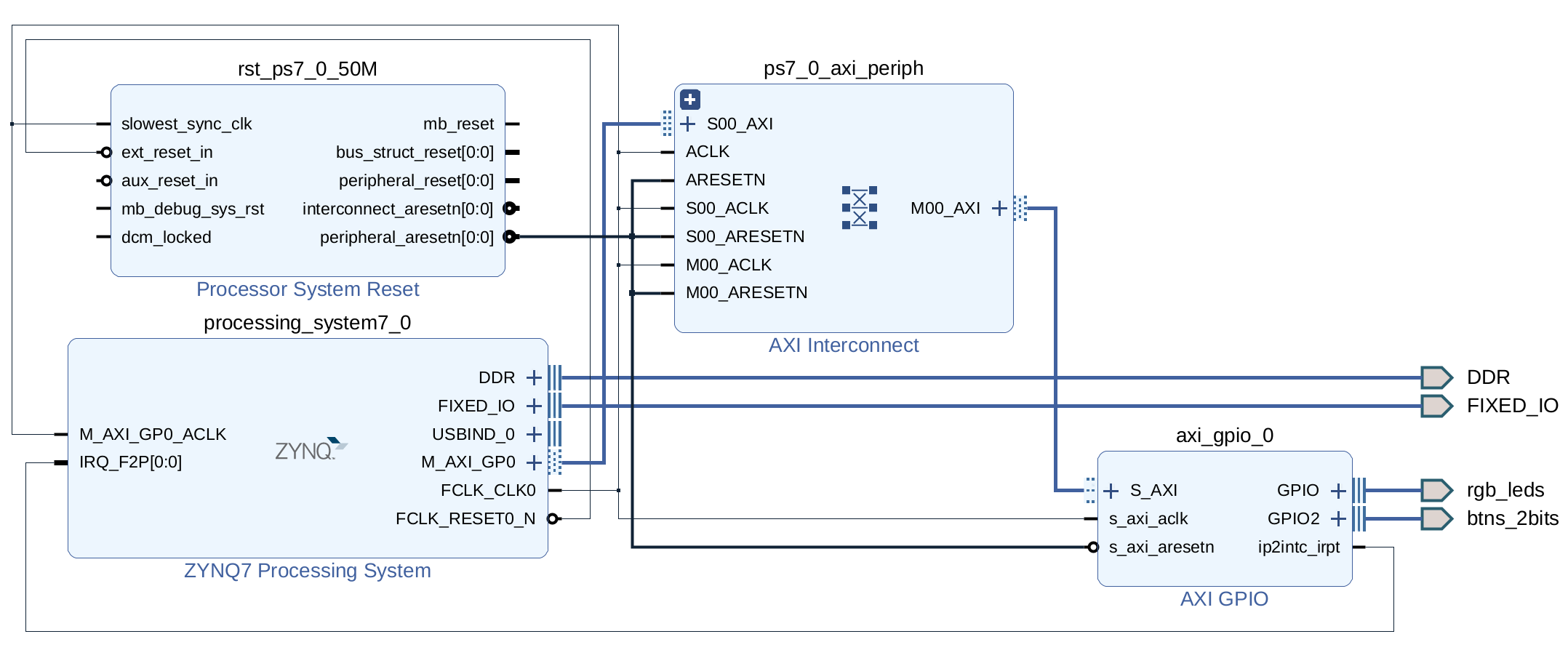 Figure 2. Block diagram single AXI GPIO.
Changes in software
Removing one GPIO module from the block diagram changes the xparameters.h file.
The new version defines only one AXI GPIO instance instead of two (#define XPAR_XGPIO_NUM_INSTANCES 1) and marks it as dual (#define XPAR_AXI_GPIO_0_IS_DUAL 1) with device ID 0 (#define XPAR_AXI_GPIO_0_DEVICE_ID 0).
The interruption now comes from GPIO_0 instead of GPIO_1 (#define XPAR_GPIO_0_INTERRUPT_PRESENT 1), and the connection name is updated accordingly (#define XPAR_FABRIC_AXI_GPIO_0_IP2INTC_IRPT_INTR 61U).
The changes mentioned must be considered in the new main file. Starting from the main function, the initialisation of gpio_btns was removed. In the initialisation function, I modified the XGPIO instance to the right one (gpio_device). The same goes for the handler function; the references were updated in the interrupt disable, enable and clear functions.
The key change to pay attention to is choosing the right channel to read the interrupt signal. Now, the buttons are connected to channel 2 in the AXI GPIO module, which is reflected in the definition #define BTN_INT XGPIO_IR_CH2_MASK.
Just one comment before closing. Because the AXI GPIO generates the interrupt signal, it will do it when there are changes in channel 1 or 2. The definition of the interrupt mask is essential to avoid triggering an interrupt when there is a change in channel 1, in this example, when an LED is turned on or off.
And that’s all; the new code is simpler, and the functionality is the same.
Complete code
#include "xparameters.h"
#include "xgpio.h"
#include "xil_types.h"
#include "xscugic.h"

#define GPIO_ID XPAR_AXI_GPIO_0_DEVICE_ID // LEDs and buttons
#define LED_CHANNEL 1
#define BTN_CHANNEL 2
#define INTC_DEVICE_ID XPAR_PS7_SCUGIC_0_DEVICE_ID
#define INTC_GPIO_INTERRUPT_ID XPAR_FABRIC_AXI_GPIO_0_IP2INTC_IRPT_INTR
#define BTN_INT XGPIO_IR_CH2_MASK

XGpio_Config *cfg_gpio;
XGpio gpio_device;
XScuGic INTCInst;


// Interrupt handler
void interrupt_handler_btns()
{
	u32 leds;
	u32 btns;
	u32 led_mask = 0b100001; // 0bBGRBGR

	// Disable GPIO interrupts
	XGpio_InterruptDisable(&gpio_device, BTN_INT);

	// Read both buttons
	btns = XGpio_DiscreteRead(&gpio_device, BTN_CHANNEL);

	// Find which button is pressed and turn on the
	// corresponding LED
	if (btns == 0b01) {
		leds = led_mask & 0b000001;
	}
	else if (btns == 0b10) {
		leds = led_mask & 0b100000;
	}
	else if (btns == 0b11) {
		leds = led_mask;
	}
	else {
		leds = 0;
	}
	XGpio_DiscreteWrite(&gpio_device, LED_CHANNEL, leds);

    XGpio_InterruptClear(&gpio_device, BTN_INT);

    // Enable GPIO interrupts
    XGpio_InterruptEnable(&gpio_device, BTN_INT);
}


// Interrupt Initialization
void init_interrupt(u16 GicDeviceId, XGpio *GpioInstancePtr)
{
	XScuGic_Config *IntcConfig;

	// GIC initialization
	IntcConfig = XScuGic_LookupConfig(GicDeviceId);
	XScuGic_CfgInitialize(&INTCInst, IntcConfig,
			IntcConfig->CpuBaseAddress);

	// Connect to the CPU
	Xil_ExceptionRegisterHandler(XIL_EXCEPTION_ID_INT,
			(Xil_ExceptionHandler)XScuGic_InterruptHandler,
			&INTCInst);
	Xil_ExceptionEnable();

	// Connect GPIO interrupt to handler
	XScuGic_Connect(&INTCInst,
			INTC_GPIO_INTERRUPT_ID,
			(Xil_ExceptionHandler)interrupt_handler_btns,
			(void *)GpioInstancePtr);

	// Choose and enable interrupt in the GPIO module
	XGpio_InterruptEnable(&gpio_device, BTN_INT);
	XGpio_InterruptGlobalEnable(&gpio_device);

	// Enable GPIO interrupt in the GIC
	XScuGic_Enable(&INTCInst, INTC_GPIO_INTERRUPT_ID);
}


int main()
{
	// Initialize AXI GPIO device
	cfg_gpio = XGpio_LookupConfig(GPIO_ID);
	XGpio_CfgInitialize(&gpio_device, cfg_gpio,
			cfg_gpio->BaseAddress);

	// Set direction of the GPIO bits.
	// Bits set to 0 are output and bits set to 1 are input.
	XGpio_SetDataDirection(&gpio_device, LED_CHANNEL, 0);
	XGpio_SetDataDirection(&gpio_device, BTN_CHANNEL, 0b11);

	// Initialize interrupt controller
	init_interrupt(INTC_DEVICE_ID, &gpio_device);

	while (1);
}
Bibliography
I got information and part of the code from the following sources.
Enjoy Reading This Article?
Here are some more articles you might like to read next: